

How to create a group and invite friends on
open(Create) Group
aboutSignal opens a group, and new groups can only be created on the Signal mobile app.

For example, iniPhone You can click the pen icon at the top to open the options for the next page (i.e., New Message page).
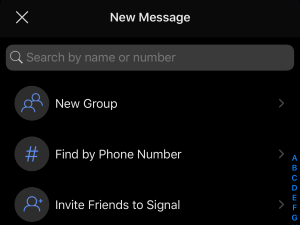
chooseNew Group.
Next, you can check the contacts you want to add to the new group(contacts). Of course, you can check multiple contacts at the same time.
Enter a name for your newly created group(group name).
ClickCreate.
This new one will be opened in the futureThe Group will appear in the chat list.
Group security
existSignal’s newly created groups have these security features:
· All chat records in the Group are encrypted (private).
· Chat information in Group is transmitted through Internet Wifi or mobile phone data traffic.
·You can passThe QR code or link of the group invites other Signal users to join the group.
Group administrator
groupadmin (administrator) has higher permissions, including:
· Different permissions can be assigned to different group members, such as editing group members, information or modifying the time setting of the message disappearing timer.
·Remove any group member(Yes, anyone can be kicked out of the group).
Other restrictions
everyThe maximum number of group members is 1,000.
Notice,Signal does not allow opening new groups on the Desktop version.
Invite friends actively/contact join group
You can pass2 methods to actively invite friends/contacts to join group chat.
method1: Create a group link (group link)
open agroup chat and click group name to enter the Chat Settings page.
chooseGroup Link.
ClickShare can copy the link or share the link.
method2: Generate a QR code (two-dimensional code)
open agroup chat and click group name to enter the Chat Settings page.
chooseGroup Link and select Share.
chooseQR code.
place thisShare the QR Code (picture) with your friends and let them scan the QR Code and join the group.
数҈字҈星҈球҈͏







